 Edith
Social Manager
Multiple social media accounts side by side on Mac
All your social accounts, signed in and side by side.
Social Manager is an Edith extension that keeps a separate login for each social account and groups accounts into profiles, so you can open several accounts on the same site at once, in tabs or side by side.
Most sites let a browser hold one login at a time. Running a personal account, a brand account and a client account usually means private windows, browser profiles or signing out and back in all day. Social Manager gives each account its own cookies and website storage on this Mac. Sign in once and it stays signed in across restarts, separate from every other account, including other accounts on the same site.
Accounts are grouped into profiles named after a person, brand or client, each with an optional emoji or initials as a badge. Instagram, Facebook, X, YouTube, LinkedIn and Gmail are ready to pick, and any HTTPS website can be added and given as many separate sessions as you need, which covers other networks and a client's own dashboard. For Google services, an account can share its profile's Google session, so a brand's YouTube and Gmail stay signed in together while other profiles keep their own Google logins.
Open a profile and its accounts open in tabs, or choose Open all side by side to see them in resizable panes. You can put an account next to the focused one even when it is on a different platform, and move an account into its own window with Open in new window. Familiar browser keys work: ⌘1 to ⌘9 pick a tab, ⌘R reloads, ⌘F finds on the page and ⇧⌘T reopens a closed tab. Social Manager is a workspace for signed-in sites, not a scheduler; you post with each site's own tools.
Updated
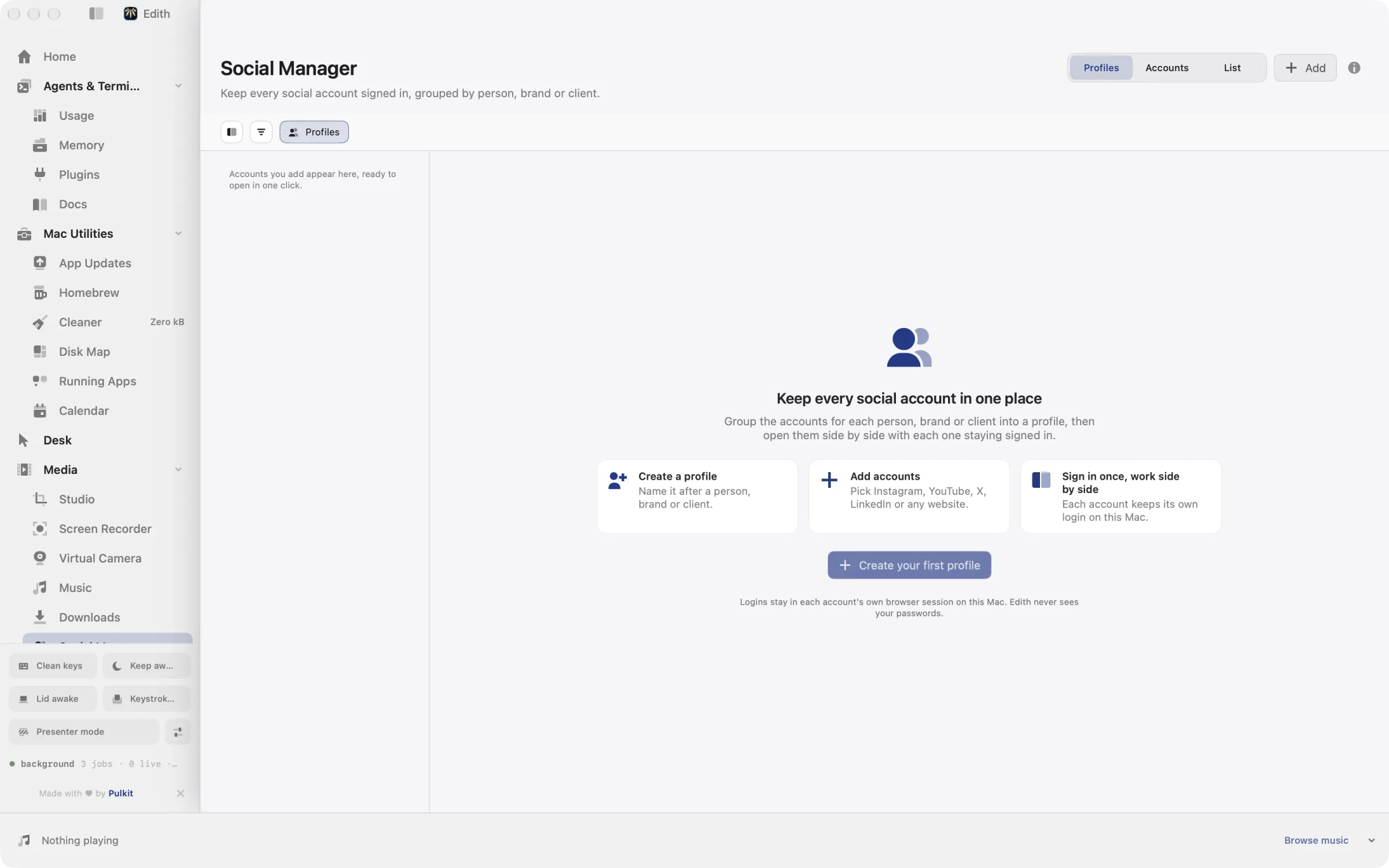
How to use multiple social accounts at once on Mac
- 1
Create a profile
Name it after a person, brand or client.
- 2
Add accounts
Pick Instagram, YouTube, X, LinkedIn or any website and sign in once.
- 3
Open them side by side
Use tabs or resizable panes to work across platforms.
What it does
Open several social accounts at once
Each account keeps its own login, side by side.
Does macOS do this already?
Can I be logged in to two Instagram accounts at once on a Mac?
Not in a single browser profile, because every tab shares the same login cookie. The usual options are Safari profiles on macOS 14 and later, separate Chrome or Edge profiles, or private windows, and each is a separate browser window to manage. Some sites offer an account switcher, but it swaps one account for another rather than showing both. Social Manager keeps each account in its own session inside one workspace, grouped by person or client, with tabs and side-by-side panes.
Use cases
Run a brand and a personal Instagram at once
Create a profile for the brand and one for yourself, add Instagram to each and sign in once per account. Open both side by side to reply to comments on the brand while you check messages on your own account, with no signing out in between.
Switch between clients as a freelancer
Give each client a profile holding their X, LinkedIn and YouTube accounts. At the start of a client's slot, open all their accounts in tabs and move between them with ⌘1 to ⌘9; close them and open the next client's profile when you are done.
Keep a channel's YouTube and Gmail together
Add YouTube and Gmail to the channel's profile with Use this profile's Google session on. Both stay signed in to the channel's Google account, while your personal Google account lives in another profile and never gets mixed up with it.
Permissions and requirements
Permissions
- None. Accounts are web sessions that Edith stores on this Mac
Requirements
- macOS 14 or later on Apple silicon
- An HTTPS address for any custom website you add
Frequently asked questions
Do I stay logged in after restarting my Mac?
Yes. Each account keeps its own cookies and website storage on this Mac, and its login and account URL are saved across app restarts, so you sign in to each account once.
Which social networks does Social Manager support?
Instagram, Facebook, X, YouTube, LinkedIn and Gmail are built in. You can add any other HTTPS website as a platform, and every account you create on it gets its own separate session.
Can accounts in one profile share a Google login?
Yes. Turn on Use this profile's Google session for an account and it shares cookies with that profile's Gmail and linked Google accounts. Other profiles keep their own Google logins, and the account's separate session is kept if you switch the option back.
Does Social Manager post or schedule content?
No. It shows the real websites, signed in, and you post with each site's own tools. There is no scheduling, analytics or automation built in.
Is Social Manager included in the one-time Edith price?
It is. Social Manager sits in Edith's Media extensions, and the same single purchase unlocks it with all the others.
More in Media

Get Edith.
From $35 once. No subscription. No account.
Needs a license key · macOS 14 or later on Apple silicon · 6.4 MB