 Edith
Homebrew
Homebrew GUI for Mac
Everything Homebrew can install, with buttons instead of commands.
Homebrew is an Edith extension that gives the Homebrew package manager a window on your Mac: browse and search formulae and casks, see which installed packages have updates, and install, upgrade or remove them.
Homebrew is how most developers install command line tools such as ripgrep, jq or git, and many people use it for Mac apps too, through casks. It is fast, but you have to remember the commands, the difference between a formula and a cask, and to run brew outdated now and then. The Homebrew extension shows the same information as a list. Switch between Formulae and Casks, filter to what is installed, and packages with a newer version are flagged as soon as Edith sees one.
Every action is a button beside the package. Search by name, open a package to read what it is, then press Install. Upgrade appears on anything outdated. Uninstall asks you to confirm before it runs, so a stray click cannot remove a tool your projects rely on. Long operations show their progress, and an install, upgrade or uninstall that is still running can be cancelled.
If Homebrew is not on your Mac yet, the page offers a button to install it; the Homebrew installer asks for your Mac password once. Edith drives the brew already installed on your Mac, so anything you do in the window shows up in Terminal and the other way round. App Updates also reads Homebrew's list of outdated casks, so cask apps appear next to your other app updates.
Updated
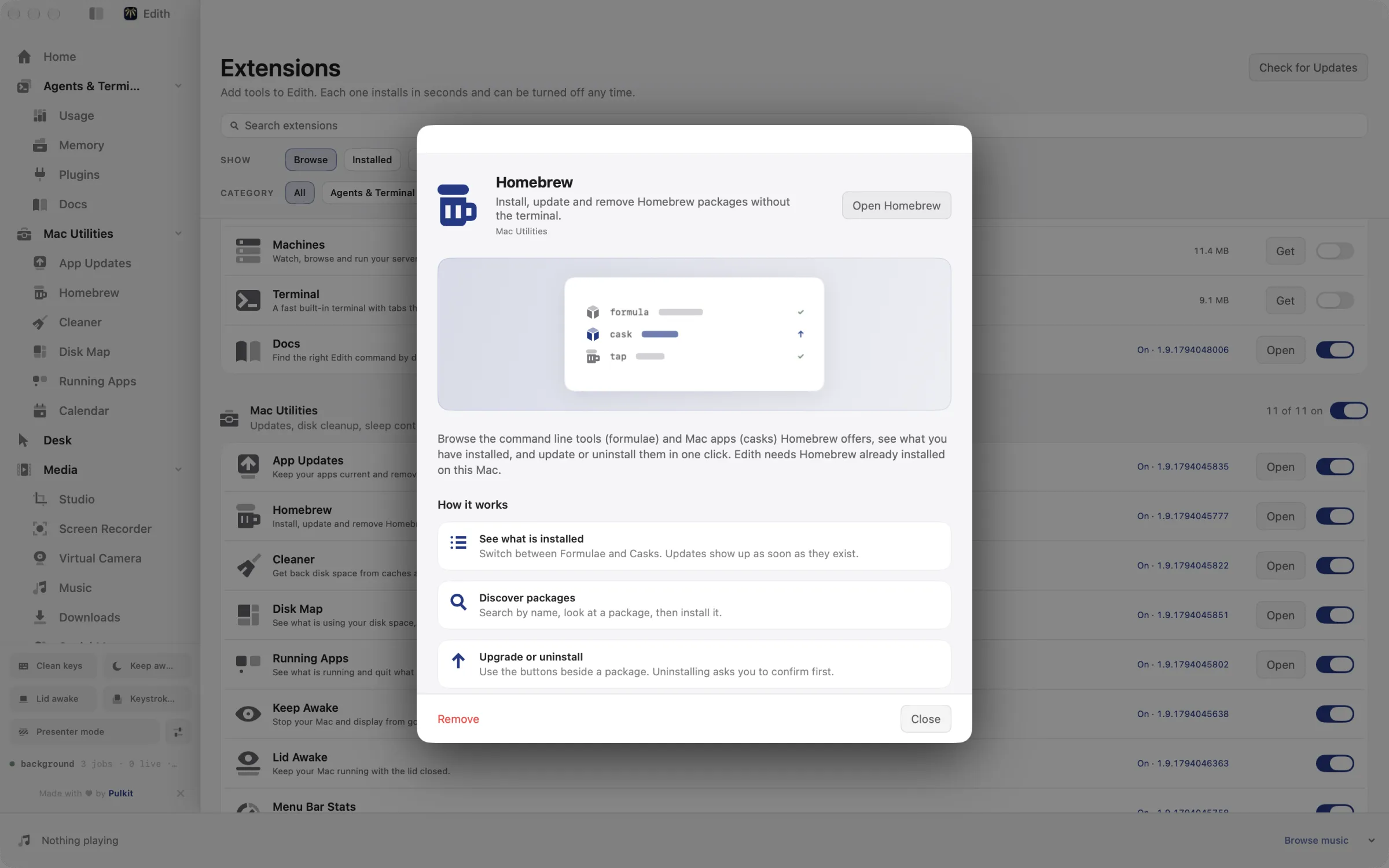
How to install and update Homebrew packages without Terminal
- 1
See what is installed
Switch between Formulae and Casks. Updates show up as soon as they exist.
- 2
Discover packages
Search by name, look at a package, then install it.
- 3
Upgrade or uninstall
Use the buttons beside a package. Uninstalling asks you to confirm first.
What it does
Install a Homebrew package
Search formulae and casks and install them without the terminal.
Does macOS do this already?
Does macOS come with a Homebrew app?
No. Homebrew is a free, open-source package manager that is not made by Apple and normally runs in Terminal. macOS has the App Store for apps, but nothing that manages command line tools or casks. The Homebrew extension is a window over your own brew install: it lists what you have, flags updates and runs the same commands for you.
Use cases
Set up a new Mac
Search for the tools you install on every machine, such as git, node, ripgrep or a cask like Visual Studio Code, and install them one after another from one window instead of pasting commands from an old notes file.
A weekly update pass
Open Formulae, filter to packages with updates and upgrade the ones you want, then do the same for Casks. Anything you need to keep on an older version for a project can simply be left alone.
Let an agent fetch a missing tool
When Claude Code needs jq or ffmpeg to finish a task, it can search for and install the formula through Edith's MCP tools, and the new package shows up in the Homebrew page afterwards.
From the terminal and your coding agents
Every example returns JSON with --json, and agents can call the same thing over MCP.
$ ed brew ls
$ ed brew ls --outdated
$ ed brew search ripgrep
$ ed brew install ripgrep| Command | MCP tools |
|---|---|
ed brew | edith_brew_* |
Connect Claude Code, Codex, Cursor or another client through the Edith MCP server.
Permissions and requirements
Permissions
- No macOS privacy permission. Installing Homebrew itself asks for your Mac password once.
Requirements
- macOS 14 or later on Apple silicon
- Homebrew, which the page can install for you if it is missing
- An internet connection to search, install and upgrade packages
Recent changes
Frequently asked questions
What is the difference between a formula and a cask?
A formula is usually a command line tool or library, such as ripgrep or python. A cask installs a Mac app, such as a browser or code editor, into Applications. The page has a switch for each, and the terminal commands take --kind formula or --kind cask.
Do I need to install Homebrew first?
Edith needs Homebrew on the Mac, but you do not have to set it up by hand. If it is missing, the page shows an install button, and the package list loads as soon as the installer finishes.
Does it replace brew in Terminal?
No, it uses it. Packages installed from the window appear in brew list, and packages you install in Terminal appear in the window. You can keep using both.
Can Claude Code install Homebrew packages through Edith?
Yes. The MCP server exposes tools such as edith_brew_search, edith_brew_install and edith_brew_upgrade. Uninstalling previews the exact plan first, the same as ed brew uninstall without --yes, and only runs once it is confirmed.
Can I upgrade every outdated package at once?
The Homebrew page upgrades one package at a time, as does ed brew upgrade with a package name. For apps, App Updates can run several updates together, Homebrew casks included.
Is the Homebrew extension part of Edith's one-time price?
Yes. It comes with Edith like every other extension, so a single purchase covers it. Homebrew itself is free.
More in Mac Utilities

Get Edith.
From $35 once. No subscription. No account.
Needs a license key · macOS 14 or later on Apple silicon · 6.4 MB