 Edith
Usage
Claude Code usage tracker for Mac
See what your coding agents cost and how close you are to each plan's limits.
Usage is an Edith extension that reads the session history Claude Code and Codex keep on your Mac, adds your Cursor usage, and shows tokens, estimated cost and rate limits by day, model and project.
Claude Code and Codex write a log entry for every request they make, and those logs pile up in your home folder whether you look at them or not. Usage parses them, counts input, output and cache tokens per request, and prices each one with a bundled list of public model rates. On a flat subscription you never pay those amounts, but the figure still tells you which models and repositories do the heavy lifting. Only token counts, model names, timestamps and folders are used. Your prompts and code are never read.
Rate limits are the other half. Claude and Codex meter plans in a five-hour session window and a weekly window, and Cursor meters included usage in billing-cycle pools. Usage polls each provider with the sign-in you already have on this Mac and draws every window as a ring with a countdown to its reset. The same numbers sit in the menu bar as compact percentages that turn amber at 60 percent and red at 85 percent by default, or follow a time-aware risk tint that compares your use with an even pace to the reset.
It is built for people who run agents for hours and keep hitting a wall halfway through a task, and for anyone who wants to know which project ate a week of quota. A GitHub-style heatmap shows daily spend across your whole history, and the project view matches each session's folder, worktrees included, to its repository.
Updated
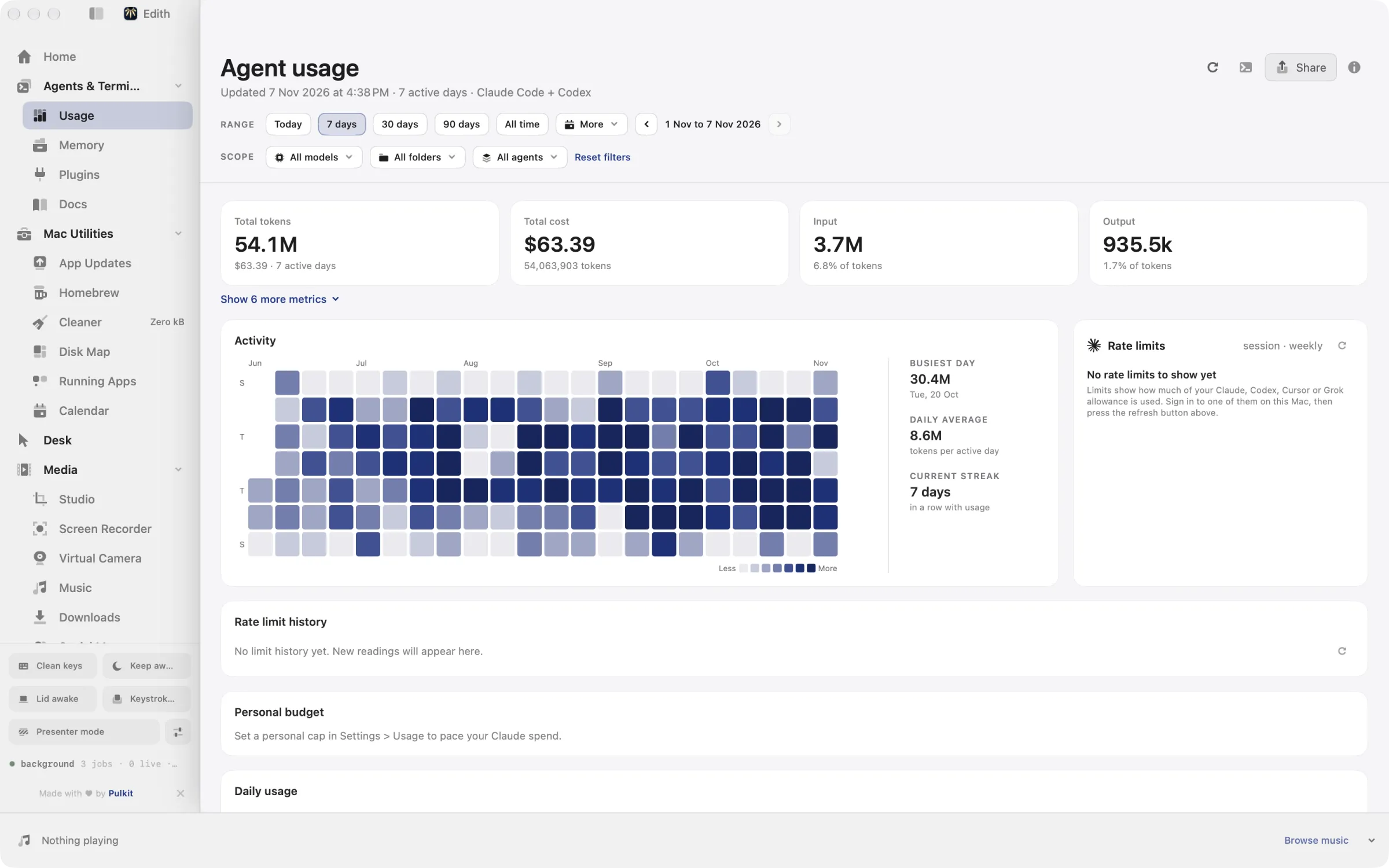
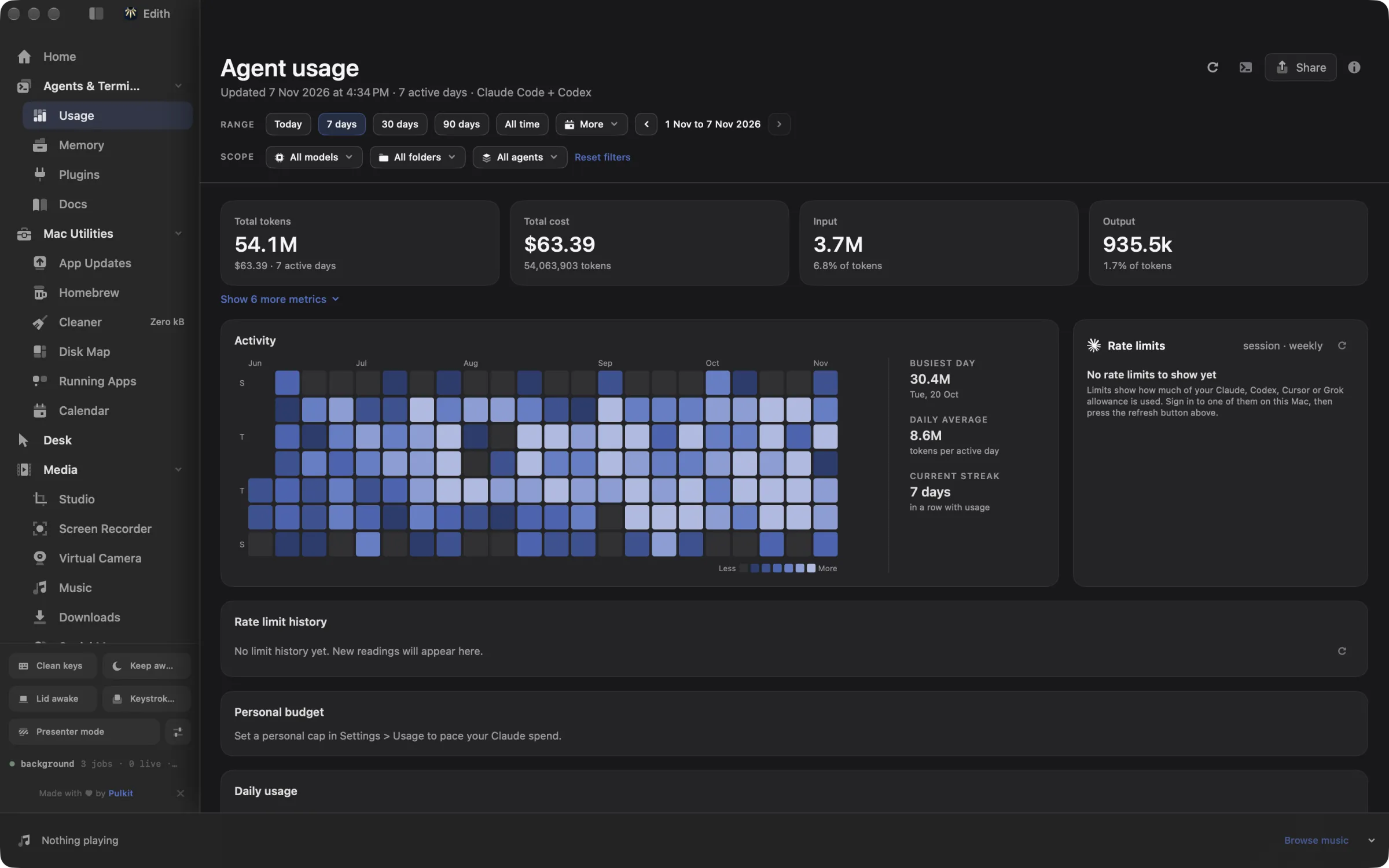
How to check your Claude Code usage and limits on Mac
- 1
Collect your history
Open Usage and press the refresh button at the top. The first run can take a few minutes.
- 2
Explore the numbers
Filter by range, model, project or agent to see where tokens and money go.
- 3
Watch your limits
Rate limits show how much of each plan you have used and when it resets.
- 4
Get warned early
Turn on limit alerts in settings to hear about it before you run out.
What it does
See what your agents cost
Tokens and spend by day, model and project.
Check your rate limits
How much of each plan you have used and when it resets.
Get warned before a limit
Turn on alerts so you hear about it before you run out.
Does macOS do this already?
Can a Mac show Claude Code usage on its own?
No. macOS has no view of coding agent usage, and Activity Monitor only shows the processes. Each tool reports its own numbers in its own place: Claude Code and Codex can print plan usage from inside a session, and Cursor shows usage on its website. Usage puts Claude, Codex and Cursor side by side, keeps the history after the windows reset, adds cost by project, and warns you before a limit instead of after.
Use cases
Plan a long agent run around the weekly reset
Before you start a multi-hour refactor in Claude Code, glance at the weekly ring and its countdown. At 80 percent with two days to go, turn on the ahead-of-pace alert so Edith warns you if the recent burn rate would hit the cap before the reset, or move the job to Codex, whose limits sit in the next ring.
Find the repository that burns your quota
Open the project drilldown and sort by cost. Sessions from every worktree of a repository roll up into one row, so a monorepo with five checkouts shows as one line instead of five. Folders that are not on GitHub are matched too, and ed usage attribution shows how each one was assigned.
Count agents running on your build servers
If Claude Code or Codex also runs on computers you added in Machines, ed usage machines collect runs a collector there over SSH and brings the totals back. The first run on a machine installs what it needs. Those machines then join every refresh, and you can filter the dashboard to one machine or to this Mac alone.
Share a month of agent work
ed usage export renders highlights, activity, daily and busiest cards as high-resolution PNG images, and --clipboard copies the first one, ready to drop into a team update or a post about what you built.
From the terminal and your coding agents
Every example returns JSON with --json, and agents can call the same thing over MCP.
$ ed usage summary
$ ed usage limits
$ ed usage daily
$ ed usage refresh| Command | MCP tools |
|---|---|
ed usage | edith_usage_* |
Connect Claude Code, Codex, Cursor or another client through the Edith MCP server.
Permissions and requirements
Permissions
- No Accessibility, Screen Recording or Full Disk Access
- Keychain access to read your existing Claude Code sign-in, which macOS may ask you to allow
- Notifications, only if you turn on limit alerts
Requirements
- macOS 14 or later on Apple silicon
- Claude Code, Codex or Cursor signed in on this Mac
- The Machines extension and SSH access, to collect usage from other computers
Recent changes
- FixedHistory no longer double counts or freezes costs, and it now includes your full Cursor, Cursor Cloud and Codex history.v1.0.14,
- FixedStatus line recorders from different copies of Edith no longer nest inside each other.v1.0.5,
- FixedKeep the activity row inside the page.v0.0.389,
- FixedRead remote WAL agent databases and isolate their failures.v0.0.382,
- FixedKeep remote machine usage fresh and explain when it is not.v0.0.381,
Frequently asked questions
Does Usage read my prompts or code?
No. It reads the token counts, model name, timestamp and working folder of each entry in the agents' session logs and skips the message text. Rate limits come from the provider's own usage endpoint, using the login that Claude Code, Codex or Cursor already saved on this Mac.
How accurate is the cost figure?
It is an estimate. Usage multiplies each request's tokens, including cache reads and writes, by a bundled table of public per-token prices. If you pay a flat monthly plan, read it as a relative measure of which models and projects use the most, not as a bill.
Which coding agents does it track?
Claude Code and Codex history comes from their local session logs. Cursor rate limits and usage history come from your Cursor account. The rings and menu bar readout cover Claude, Codex and Cursor windows, and settings choose what the menu bar shows for each provider.
Can Claude Code check its own limits over MCP?
Yes. Every ed usage command is also a tool in Edith's MCP server, such as edith_usage_limits, edith_usage_summary and edith_usage_daily. An agent can read the weekly window before it starts a long task, and ed usage limits --refresh asks Edith to poll the providers again first.
Will it warn me before I run out?
If you turn alerts on. Options include crossing an almost-capped line (90 percent by default), a pace that would hit the cap before the reset, hitting 100 percent with the reset time, a capped window coming back, and a morning outlook when a weekly window looks tight. ed usage alerts explains what each window would alert about right now.
Is Usage included in Edith's one-time price?
Yes. Usage is one of the extensions included with an Edith license. There is no separate subscription for usage tracking and no per-agent fee.
Guides
- How to Check Claude Code Usage Limits on MacCheck Claude Code usage limits on your Mac with /usage, claude.ai settings and the status line, or keep the 5-hour and weekly limits in the menu bar.
- How to Check Codex Usage Limits on MacCheck Codex usage limits on your Mac with /status and the ChatGPT usage dashboard, or keep the 5-hour and weekly Codex limits in the menu bar.
- How to Run Multiple Claude Code Agents on MacRun several Claude Code agents in parallel on a Mac with git worktrees and agent view, then watch every agent on one board and answer the blocked ones.
- How to Add an MCP Server to Claude Code on MacAdd an MCP server to Claude Code on a Mac with claude mcp add, pick the right scope, check it with /mcp, and connect Edith's tools in one command.
Compare and alternatives
- Edith vs Raycast: One-Time Mac Toolkit ComparedEdith vs Raycast on Mac: a free launcher with paid AI plans, or one payment for a launcher plus agent usage, MCP control and Mac utilities.
- Edith vs Alfred: Mac Launcher and Toolkit ComparedEdith vs Alfred for Mac: a free launcher with a paid Powerpack and a deep workflow ecosystem, or a launcher plus agent tools, MCP and Mac utilities.
- ccusage Alternative for Mac: Menu Bar Usage TrackerA ccusage alternative for Mac: Claude Code and Codex cost and live rate limits in the menu bar, with alerts and SSH fleet totals. Paid once, with a CLI.
- Amphetamine Alternative: Keep Mac Awake for AgentsAn Amphetamine alternative for Mac: keep a MacBook running with the lid closed while agents and builds finish, with timers, battery floors, CLI and MCP.
Used in
- Run Coding Agents Overnight on a Mac With EdithRun Claude Code and Codex agents overnight on a Mac: keep it awake with the lid closed, queue the next task, and wake up to limits, costs and results.
- Manage Servers From Your Mac With EdithManage SSH servers from your Mac: health, terminals, Docker, port forwards, a database client and agent usage across machines, from one app and the ed CLI.
More in Agents & Terminal

Get Edith.
From $35 once. No subscription. No account.
Needs a license key · macOS 14 or later on Apple silicon · 6.4 MB