 Edith
Studio
Offline PDF, image and video tools for Mac
The PDF, image, video and audio jobs you would normally upload to a website, done in one Mac app.
Studio is an Edith extension with dozens of file tools for PDFs, images, video, audio, Office documents and archives, all processed on your Mac.
Most people handle one-off file jobs by searching for a website: merge two PDFs, shrink a video for email, turn HEIC photos into JPG, cut out a background. That means uploading private documents to someone else's server and living with file size limits and watermarks. Studio puts those tools in one window. Drop files in and it suggests the tools that fit them, or browse the groups and search by what you want to do.
The PDF group is the deepest. It can merge, split, reorder and remove pages, compress, sign, redact text or areas, fill forms, add page numbers or watermarks, run OCR on scans, protect or unlock with a password and repair damaged files. It also converts PDFs to Word, Excel, PowerPoint, Markdown, text or images, and turns Office files, images and web pages into PDFs. Image tools cover background removal, resizing, compression, format conversion, upscaling, face blurring, metadata removal and a photo editor. Video and audio tools trim, merge, compress, convert, change speed, add subtitles or music and reduce noise, and a timeline editor handles cuts.
Results are saved next to the original by default, or into Downloads or a folder you choose, and every run is listed under Projects with Show in Finder. A few video and audio tools rely on FFmpeg, and Studio shows an install button the first time one of them needs it. The AI summarizer uses Apple Intelligence on Macs that support it, and Transcribe uses on-device speech recognition.
Updated
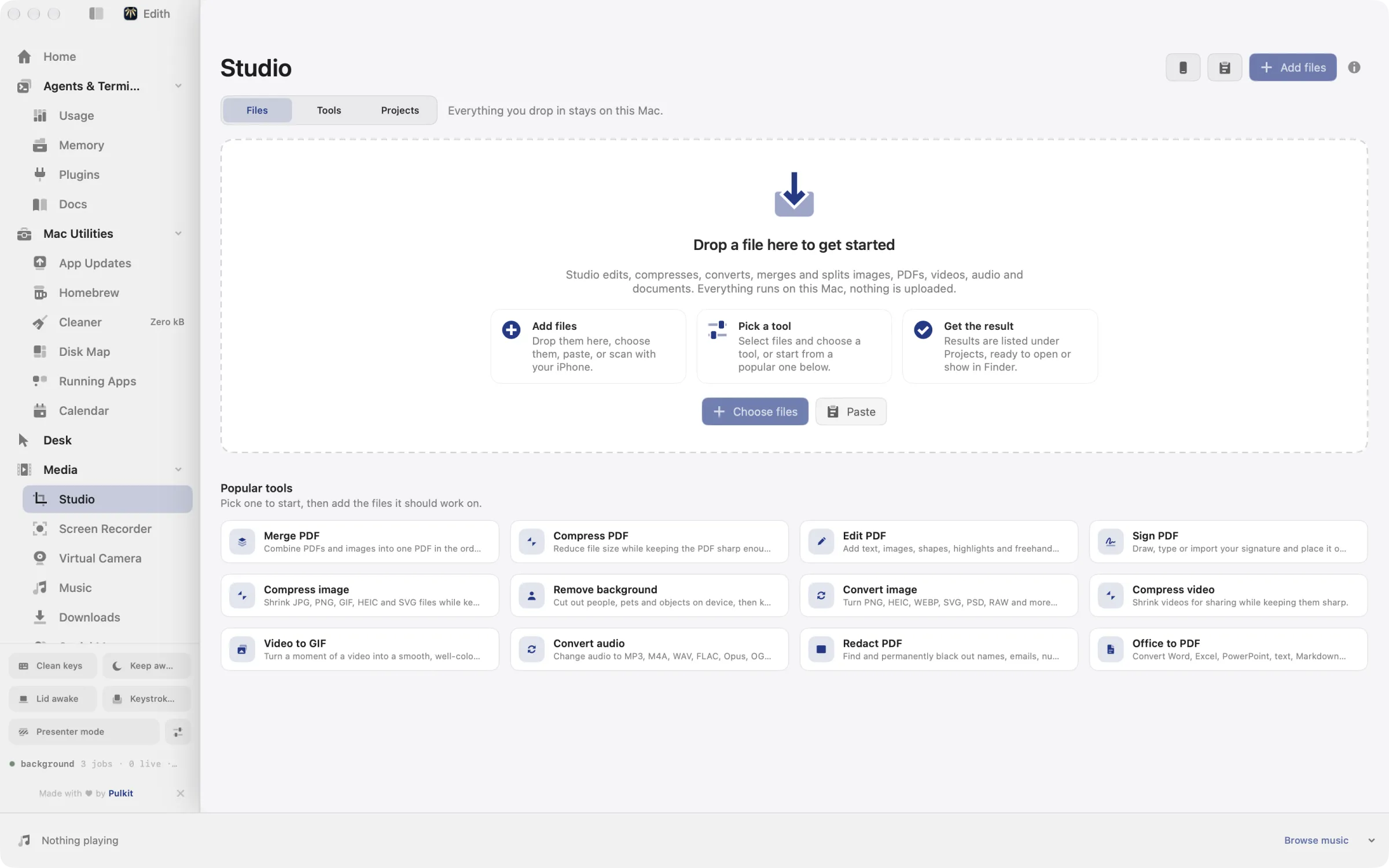
How to merge, compress and convert files on a Mac
- 1
Add your files
Drop them in, choose them, paste, or scan with an iPhone.
- 2
Pick a tool
Browse Tools or search, then open the one you need.
- 3
Adjust and run
Set options on the right and run it.
- 4
Find the result
Results are listed under Projects with Show in Finder.
What it does
Merge or sign PDFs
Combine, split, compress and sign PDF files on this Mac.
Remove an image background
Cut out the subject of a photo.
Compress or convert video
Make a video smaller or change its format.
Does macOS do this already?
Can a Mac edit PDFs and convert files without extra apps?
Quite a lot, yes. Preview combines PDFs when you drag pages between documents, signs and annotates them, can reduce file size on export and removes backgrounds from images. Finder Quick Actions convert images and create PDFs, and QuickTime Player trims video. Studio gathers those jobs in one place and adds many that the built-in apps do not offer, such as making scanned PDFs searchable with OCR, PDF to Word, video compression presets, subtitles and audio noise reduction.
Use cases
Sign and send a contract
Open the PDF in Sign PDF and place your signature, flatten it so the fields can no longer be edited, then compress it to fit under an email attachment limit, without uploading the document anywhere.
Prepare product photos
Remove the background from a set of photos, resize them to the same width, convert them to JPG or PNG and strip location metadata before you post them to a shop or a listing.
Shrink a screen recording for a pull request
Trim an export from Screen Recorder, run Compress video, or turn the important few seconds into a GIF with Video to GIF so it plays inline in a code review.
Script repetitive conversions
ed studio run pdf.merge a.pdf b.pdf merges files from the terminal, and ed studio info shows a tool's settings so a shell script or coding agent can call it with the right options.
From the terminal and your coding agents
Every example returns JSON with --json, and agents can call the same thing over MCP.
$ ed studio tools
$ ed studio info pdf.merge
$ ed studio run pdf.merge a.pdf b.pdf| Command | MCP tools |
|---|---|
ed studio | edith_studio_* |
Connect Claude Code, Codex, Cursor or another client through the Edith MCP server.
Permissions and requirements
Permissions
- None for most tools
- Speech Recognition, only when you use Transcribe
- Screen Recording, only when you record the screen into Studio
Requirements
- macOS 14 or later on Apple silicon
- FFmpeg for some video and audio tools; Studio offers to install it
- Apple Intelligence for the AI summarizer, on Macs and macOS versions that support it
Recent changes
Frequently asked questions
Are my files uploaded to a server?
No. Studio processes files on your Mac, so PDFs, photos and videos are not sent to a conversion website. Tools that fetch something by design, such as turning a web page address into a PDF, are the exception.
Can Studio remove the background from a photo?
Yes. Remove background cuts out the subject with Apple's on-device Vision framework and saves an image with a transparent background. It works on people, animals and objects.
How do I compress a PDF on a Mac with Studio?
Open Compress PDF, add the file and run it; the smaller copy is saved next to the original unless you picked another destination. Grayscale PDF and Remove pages can shrink it further.
Can a coding agent use Studio's tools?
Yes. ed studio tools lists them, ed studio info describes one, and ed studio run runs it on files. The same commands are available as MCP tools, so Claude Code, Codex or another client can merge, convert or compress files as part of a task.
Does Studio work with Word, Excel and PowerPoint files?
Yes. Word, Excel and PowerPoint files convert to PDF, and PDFs convert back to Word, Excel or PowerPoint. Documents can also be turned into Markdown or plain text.
Is Studio included in the one-time Edith price?
Yes. Studio and all of its tools come with Edith's single purchase. There are no credits or per-tool upgrades to buy.
More in Media

Get Edith.
From $35 once. No subscription. No account.
Needs a license key · macOS 14 or later on Apple silicon · 6.4 MB