 Edith
Attention
Screen time tracker for Mac
See which apps and sites really get your time, and protect your focus.
Attention is an Edith extension that records which app or website is in front of you, then shows where your day went, how much of it was focused, what you listened to and how long your coding agents worked.
Screen Time can tell you that you spent four hours in Chrome. Attention tells you which sites those were, which window titles if you allow it, and whether the time was productive by your own rules. It follows the frontmost app, and with a small local browser extension in Chrome, Chromium, Brave, Edge, Opera or Dia it records the active site too. Idle and locked time are kept apart from active time, so a lunch break does not count as an hour in Slack.
You decide how much is stored. Setup offers three levels: app names only, app names plus website domains, or detailed records with window titles and full addresses, and you can change the level later. Records live in a local database on this Mac and are copied to iCloud only when you turn on iCloud backup or run a backup yourself. Apps and sites fall into five levels from very productive to very distracting, set by you or by rules you can export as JSON and import on another Mac. With a Jev key saved, Jev can sort the apps and sites you have not classified yet.
Focus sessions are a named task with a length. When one ends, you see how much of it was undistracted. Because Edith also runs your coding agents, Attention lines up their working and waiting time against yours, by machine, agent and project, which shows whether an agent sat idle waiting for an answer while you were in another app. Music you play is summarized by track, artist, album and listening time.
Updated
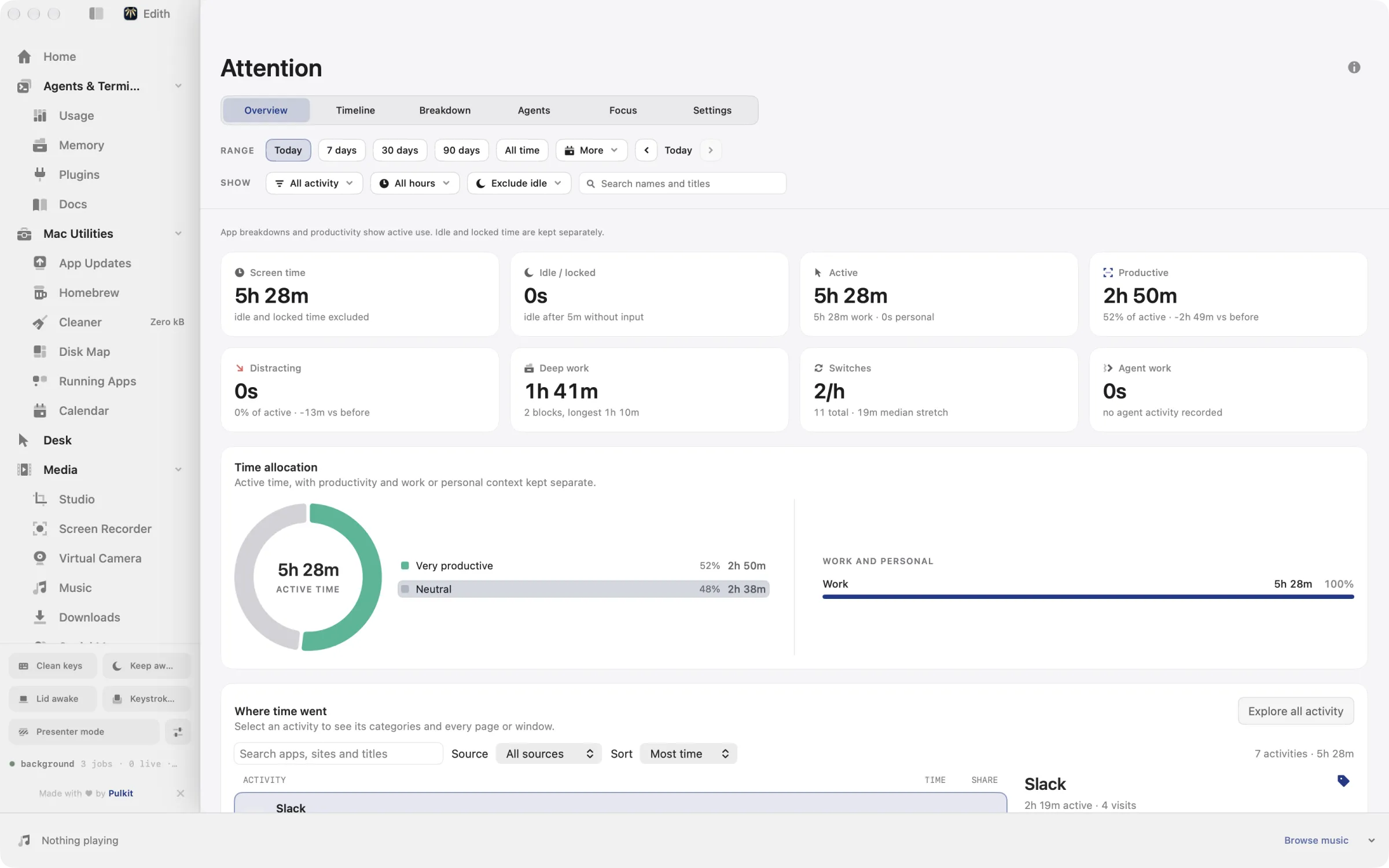
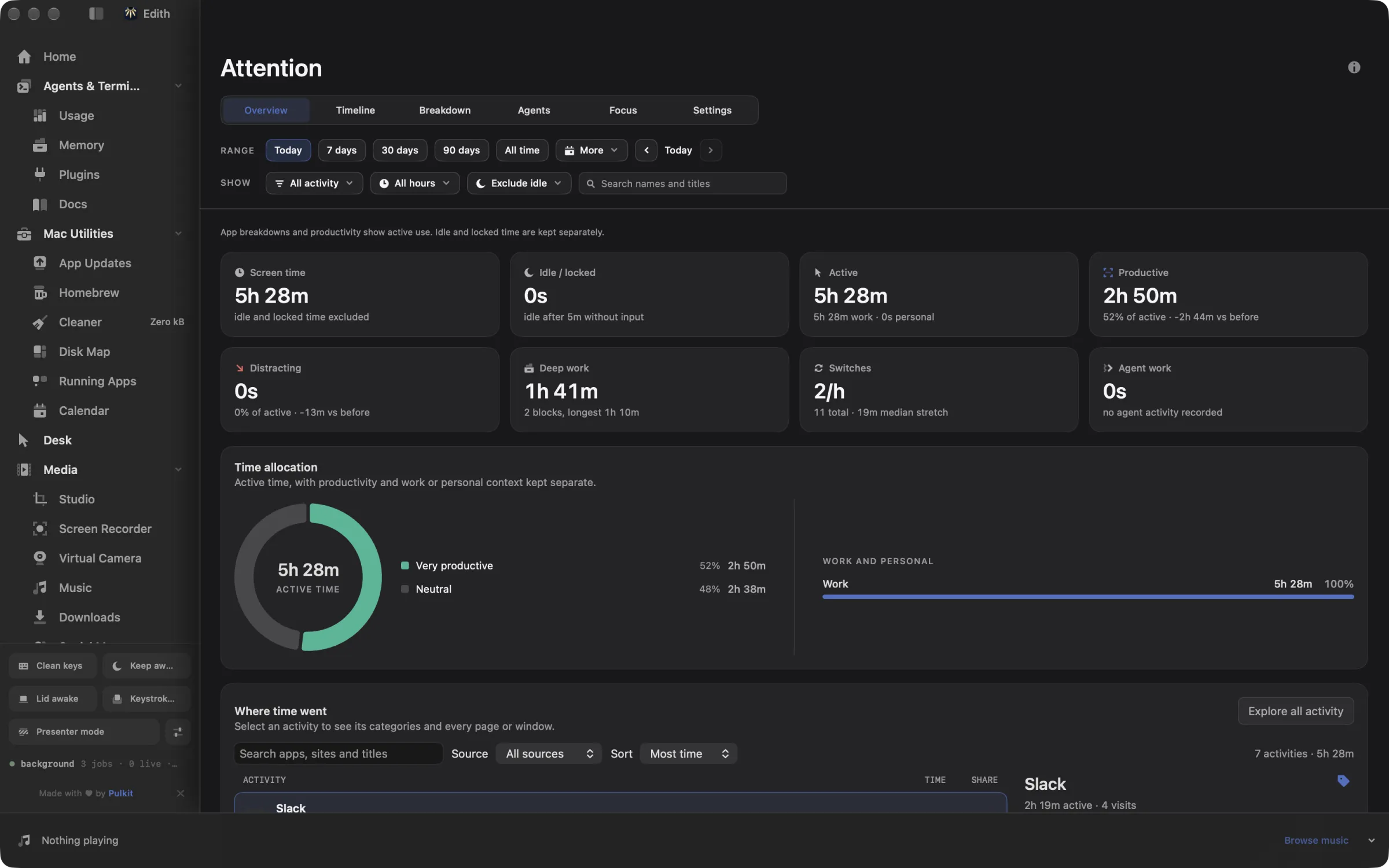
How to see where your time goes on Mac
- 1
Pick what to track
Choose apps, and optionally browser sites, on the setup screen.
- 2
Set your privacy level
Store only app names, domains, or more detail; you can change it later.
- 3
Use your Mac as usual
Charts of your apps, sites and the music you listen to appear within a few minutes.
- 4
Start a focus session
Name a task and a duration to see how much of it was undistracted.
What it does
See where your time goes
Which apps and sites get your time, day by day.
Start a focus session
Name a task and see how much of it was undistracted.
Does macOS do this already?
Doesn't Screen Time already do this on a Mac?
Partly. Screen Time in System Settings shows daily totals per app and website and counts notifications, and it can set limits. It shows totals rather than a timeline you can regroup, has no notion of focused work, and knows nothing about coding agents. Attention adds a timeline you can group by app, site, title or project, named focus sessions, your own productivity categories, agent activity and listening history, all of it readable from the ed CLI.
Use cases
Fill in a weekly timesheet
At the end of the week, group active time by project or by window title instead of by app. Time spent in the editor, the terminal and the browser on one client's work adds up into one figure you can copy into an invoice.
Protect a block of deep work
Start a focus session called write the RFC for 50 minutes, from the page or with ed attention focus start. Afterwards Attention shows how much of the session went to the document and how much to the apps you marked as distracting.
See whether your agents waited on you
ed attention agents shows each coding agent's working and waiting time by machine and project. A long waiting stretch during your meeting block is a sign to queue clearer instructions before you step away.
Bring your categories to a new Mac
ed attention rules export writes your categories and rules as JSON. On the new Mac, ed attention rules import validates the file and merges it by ID, so distracting sites stay distracting without classifying them again.
From the terminal and your coding agents
Every example returns JSON with --json, and agents can call the same thing over MCP.
$ ed attention status
$ ed attention summary
$ ed attention focus status
$ ed attention doctor| Command | MCP tools |
|---|---|
ed attention | edith_attention_* |
Connect Claude Code, Codex, Cursor or another client through the Edith MCP server.
Permissions and requirements
Permissions
- Accessibility, only for window titles at the detailed privacy level
- The Edith Attention browser extension, loaded by you, for website time in Chromium browsers
Requirements
- macOS 14 or later on Apple silicon
- Chrome 120 or later, or Chromium, Brave, Edge, Opera or Dia, for per-site tracking
- iCloud, only if you turn on backup
Recent changes
Frequently asked questions
Which browsers can it track websites in?
Per-site time comes from the Edith Attention extension, which loads in Chrome, Chromium, Brave, Edge, Opera and Dia. Other browsers, Safari included, are counted as app time, with window titles if you allow Accessibility at the detailed level.
Where is my attention data kept?
In a local database on this Mac. It goes to your iCloud only when you turn on iCloud backup in settings or run ed attention backup, and ed attention restore brings it back. If you save a Jev key and ask for auto-categorization, the names and titles of apps and sites you have not classified are sent to Jev to be sorted.
Can I start a focus session from the terminal or an agent?
Yes. ed attention focus start begins a named session and ed attention focus stop ends it. The same commands are MCP tools, edith_attention_focus_start and edith_attention_focus_stop, alongside edith_attention_summary for a day's totals.
What does agent time mean?
It is how long each coding agent was working and how long it was waiting for you, taken from the sessions the Agents extension sees. Attention shows it next to your own active time, by machine, agent and project.
Can I decide what counts as productive?
Yes. Every app, site or title can be set to one of five levels, from very productive to very distracting. ed attention categories set assigns one from the terminal, and rules can be exported and imported as JSON.
Is Attention included in Edith's one-time price?
Yes. Attention comes with every Edith license, including the browser extension, with no subscription for history or reports.

Get Edith.
From $35 once. No subscription. No account.
Needs a license key · macOS 14 or later on Apple silicon · 6.4 MB