 Edith
Color Picker
Color picker for Mac
Pick any color on your screen and copy it in the format you need.
Color Picker is an Edith extension that opens the macOS color magnifier with ⌃⌥⌘C, samples the pixel you click, and copies it as hex, rgb(), hsl(), SwiftUI or NSColor code.
Press ⌃⌥⌘C and the standard macOS color loupe appears under your pointer. Move it over a button on a website, a pixel in a screenshot or a swatch in a PDF and click. The color is on your clipboard in the format you chose, such as #1A73E8 or rgb(26, 115, 232), ready to paste into a stylesheet, a design file or a ticket. Press Escape to back out without copying anything.
Designers and developers rarely need the same color in the same form twice. Set a default format in settings: Hex, rgb(), hsl(), a SwiftUI Color(red:green:blue:) initializer or an NSColor initializer for AppKit code. Colors can be sampled in sRGB or Display P3, so the numbers match the color space your project works in rather than whatever the display happens to use.
Every pick goes into a history of up to 100 swatches. Click one in settings to copy it again, or run ed color copy 1 --format rgb to copy the latest pick in a different format without sampling it again. That helps when you grab five shades from a mockup and only later decide which one you need.
Updated

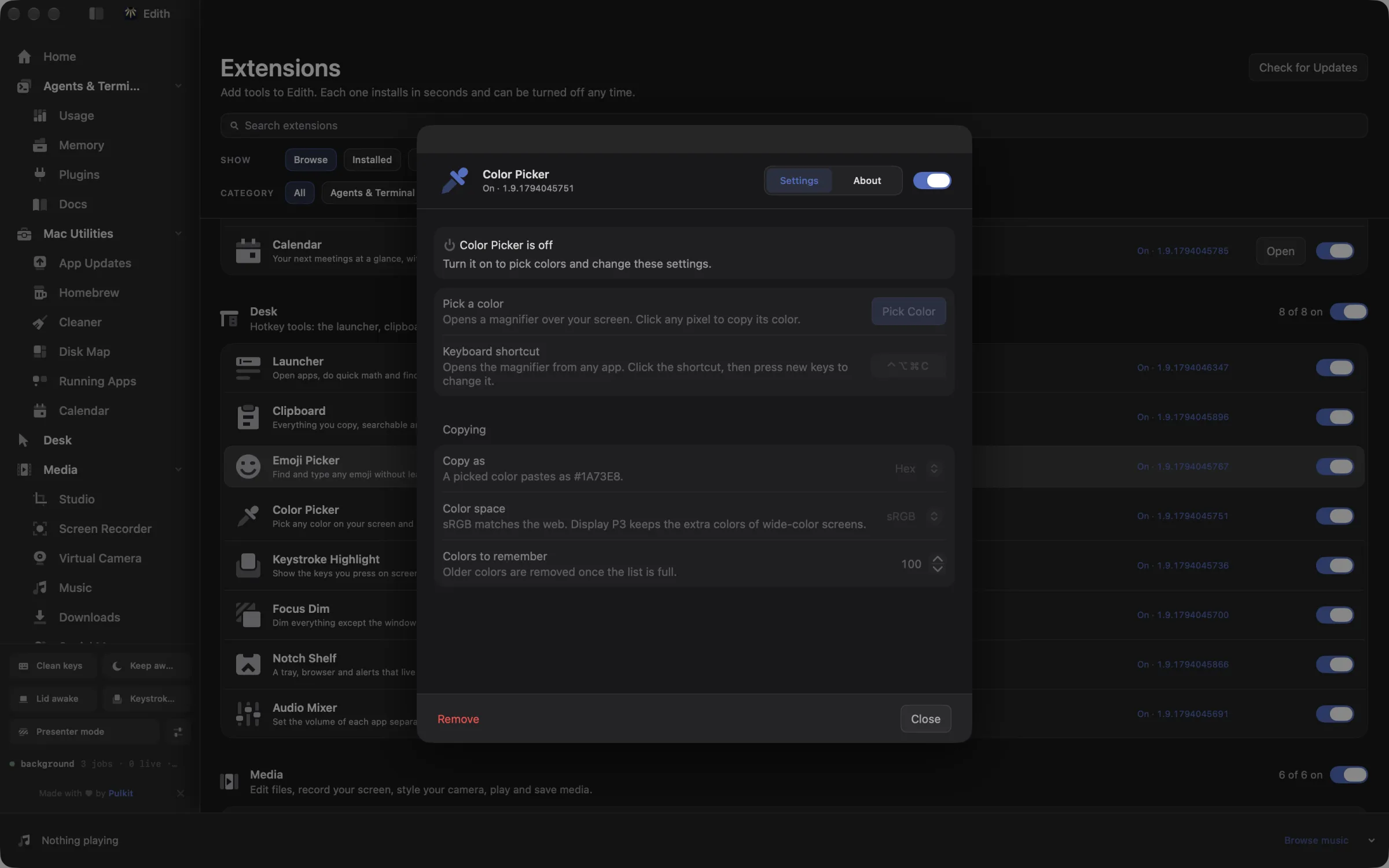
How to pick a color from your screen on Mac
- 1
Press the shortcut
A magnifier appears. You can also choose Pick Color in settings.
- 2
Click a color
Move over any pixel on screen and click to sample it.
- 3
Paste it anywhere
The color is copied in your chosen format, such as #1A73E8.
- 4
Reuse recent colors
Click a swatch in settings to copy it again.
Keyboard shortcut
| Shortcut | Action | What it does |
|---|---|---|
| ⌃⌥⌘C | Pick a color | Opens the color picker |
Works from any app. You can record a different shortcut in Edith's settings.
What it does
Pick a color from the screen
Move a magnifier over any pixel and copy its color.
⌃⌥⌘CDoes macOS do this already?
Can a Mac pick colors from the screen without an app?
Yes, in two ways. Digital Color Meter in Applications > Utilities shows the values under the pointer and can copy them as text, and the color panel in apps like TextEdit and Pages has an eyedropper. Neither gives you a ready-to-paste hex or hsl() string from a global shortcut in any app, keeps a history of picks, or writes SwiftUI and NSColor code. Color Picker adds those.
Use cases
Match a brand color from a live site
Open the site, press ⌃⌥⌘C, click the logo or the main button and paste the hex value into your CSS. If the same color is going into an iOS app, ed color copy 1 --format swiftUI gives it to you as a SwiftUI initializer.
Check contrast in a bug report
Sample the text color and the background straight from a screenshot someone attached, paste both values into a contrast checker, and put the exact numbers in your reply instead of saying it looks too light.
Build a palette from a mood board
Pick each color in turn from images open in Preview. They stack up in the history in order, and ed color ls --limit 5 prints the last five so you can drop them into a design tokens file.
From the terminal and your coding agents
Every example returns JSON with --json, and agents can call the same thing over MCP.
$ ed color pick
$ ed color ls --limit 5
$ ed color copy 1 --format rgb| Command | MCP tools |
|---|---|
ed color | edith_color_* |
ed colour | edith_colour_* |
Connect Claude Code, Codex, Cursor or another client through the Edith MCP server.
Permissions and requirements
Permissions
- None. It uses the system color sampler, so macOS does not ask for Screen Recording
Requirements
- macOS 14 or later on Apple silicon
Frequently asked questions
How do I get the hex code of a color on my Mac screen?
Press ⌃⌥⌘C, move the magnifier over the color and click. With the copy format set to Hex, the value, for example #1A73E8, is on your clipboard and ready to paste.
Does it support Display P3 colors?
Yes. Choose sRGB or Display P3 as the sampling profile in settings. The picked values are converted into that color space before they are copied, which matters for wide-gamut designs on recent Mac displays.
How many picked colors does it remember?
Up to 100, newest first. You can set a lower limit in settings, and ed color clear forgets every saved swatch.
Can my coding agent use colors I pick?
Yes. Through Edith's MCP server, edith_color_pick opens the magnifier for you to click, edith_color_ls lists recent picks and edith_color_copy copies one in any of the five formats. An agent writing CSS or SwiftUI can ask you to sample a color and use the exact value.
Is Color Picker sold separately from Edith?
No. Color Picker is covered by the same one-time Edith purchase as every other extension.
More in Desk

Get Edith.
From $35 once. No subscription. No account.
Needs a license key · macOS 14 or later on Apple silicon · 6.4 MB